
- Antivirus detects and blocks malware on a device. Endpoint security adds central policy, fleet visibility, investigation and response.
- EDR isn't the same as antivirus: it records endpoint activity so a responder can investigate and act. MDR adds people who watch and handle alerts.
- A consumer suite can protect one laptop well and still leave an IT lead without a device inventory or incident trail.
- Choose by who manages the devices and what must happen when protection fails, then test the exact plan in a pilot.
Antivirus software primarily detects and blocks malware on a device. Endpoint security software is a broader category that may combine antivirus with centralized policy, device visibility, attack-surface reduction, investigation and response. A small business should choose based on who manages its computers and what it needs to do when protection fails, not on a product label alone.
A consumer security suite can protect an individual laptop well without giving an IT lead a reliable inventory of every company machine. Conversely, an endpoint security platform can be the wrong purchase when nobody has the time or skill to manage its alerts. This guide explains the operational difference, what EDR adds, and how to build a right-sized decision checklist.
What is the difference between antivirus and endpoint security?
The difference is scope and management, and it's bigger than the product names suggest. Antivirus is a security control that's designed to identify and stop malicious software. Endpoint security is the collection of controls and workflows used to secure laptops, desktops, servers and other endpoints across an organization.
| Question | Typical antivirus | Managed endpoint security |
|---|---|---|
| Main purpose | Detect and block malware | Prevent, detect, investigate and respond to endpoint threats |
| Primary buyer | Individual or small household | IT or security owner managing a fleet |
| Visibility | Local device status | Cross-device inventory, alerts and policy compliance |
| Response | Quarantine or remove threats | Investigate activity, isolate a machine and coordinate remediation where supported |
| Policy | Settings on each device | Central deployment and configuration where supported |
| Investigation | Detection notifications and scan history | Endpoint activity, alert context and investigation workflow |
| Operations | Keep protection active and updated | Own endpoint lifecycle, alert triage, incident handling and reporting |
| Common limits | No central response and incomplete fleet view | More setup, license cost and ongoing operational work |
The columns describe categories and aren't guaranteed features of every product. Some consumer suites do offer dashboards or family management. Some business antivirus products deliver centralized control without full EDR. The exact capabilities depend on edition and license.
The practical test is whether your team can answer four things without touching every computer: which devices are covered, which ones are missing protection, what happened when an alert fired and what action was taken. If those answers matter for business continuity, look beyond a standalone consumer antivirus installation.
Does endpoint security include antivirus?
Endpoint security often includes or integrates an antivirus engine, but the phrase doesn't guarantee a particular prevention capability. Read the vendor's actual license feature matrix. Endpoint protection platform (EPP) products commonly provide malware prevention and policy management. EDR adds investigation and response functionality. A managed detection and response service (MDR) adds people and operational processes to monitor and handle alerts.
A useful mental model is layered rather than hierarchical. Antivirus is one defensive function. EPP provides preventive controls across an endpoint fleet. EDR can help security staff determine what suspicious activity occurred and respond. MDR is a service model. XDR aims to combine evidence across endpoint and other security systems. A vendor may package several layers together, but buying a product named "endpoint security" doesn't prove it includes all of them.
Microsoft describes Defender for Endpoint on Windows as providing prevention, post-breach detection and automated investigation and response, with the available capabilities dependent on the product plan. That's an example of a bundled enterprise architecture, not evidence that every vendor's entry-level endpoint license has the same features.
Is EDR the same as antivirus?
EDR isn't the same as traditional antivirus. Endpoint detection and response focuses on observing suspicious device activity, supporting investigation and enabling response actions. Antivirus concentrates on stopping malicious software, although modern engines can also use behavior and cloud detection.
An antivirus alert might tell an employee that a file's been quarantined. An EDR alert may provide an investigation trail showing the process that launched it, other activity on the same endpoint and available response actions. That added context can be especially useful when a threat isn't a familiar malicious file or when an attacker uses legitimate administrative tools.
Don't assume EDR automatically stops every attack. It doesn't. EDR needs a working configuration, sufficient telemetry, defined response policy and someone accountable for alerts. Isolation, live response, automated remediation and retention can differ by product and plan. Ask the provider to show you what happens during a simulated incident in your actual license, and don't rely on broad marketing terms.
Microsoft's published EDR explanation distinguishes detection and investigation from conventional antivirus protection. Its Windows endpoint documentation also describes the relationship between antivirus and EDR, including compatibility and passive mode. These are reasons to ask about architecture. Don't assume a single all-purpose agent behaves identically on all operating systems.
When is ordinary antivirus enough?
Of course, ordinary antivirus can be a reasonable starting point for an individual computer or a very small group of devices when protection is active, supported and regularly maintained. That decision assumes you're able to personally verify each computer, respond to warnings and keep the operating system and applications updated. If that describes your situation, this antivirus software comparison sets the consumer options side by side.
It's less convincing once staff work remotely, share company information and join or leave regularly. Without a centralized inventory, a device can lose protection while appearing normal in a spreadsheet. An owner might forget that a former employee's laptop still holds sensitive information. A threat notification might appear only on a laptop that nobody's checking.
Even a small team should document a basic device list: owner, operating system, last update, antivirus state, disk encryption, backup status and recovery contact. A simple list isn't a substitute for enterprise control, but it helps expose the operational gap that purchasing decisions need to solve.
Where business data is sensitive or regulation and customer contracts set specific controls, check what they actually require. Don't equate a product price tier with compliance. A security policy must specify the control outcome and evidence needed, not just a vendor name.
When should a business move to managed endpoint protection?
A business should consider managed endpoint protection when local antivirus administration no longer provides reliable coverage or incident accountability. Warning signs include an unknown number of active devices, frequent departures and new hires, inconsistent security settings, lost laptops, missed alerts and an inability to reconstruct what happened after suspicious behavior.
Centralized management is valuable even before advanced EDR is necessary. An IT owner may first need consistent deployment, updates, basic reporting and a way to find unmanaged devices. Buying the most advanced response platform before you've established those basics can produce an expensive console full of unresolved alerts.
Set a minimum operating requirement. Every company-owned computer should have a responsible person, a documented supported platform, active protective controls, patching, encryption where appropriate and a route for escalating security incidents. Next, decide whether your threat exposure and incident workload justify investigation and remote response features.
A remote workforce might have a higher need for centralized response because collecting a compromised laptop can be slow. A company with staff who routinely use unmanaged personal devices may need a separate access and device-management policy before an endpoint tool can deliver its expected coverage.
How do you evaluate endpoint coverage?
You'll evaluate endpoint coverage by comparing the devices that should be protected with those that are actually onboarded and reporting correctly. The numerator isn't the number of purchased licenses. It's the number of in-scope endpoints that meet your defined health requirements.
Define scope first. Count company laptops, desktops, servers and any supported mobile or virtual systems that policy requires you to monitor. Identify exclusions such as lab equipment, unsupported operating systems and contractor devices, and record their compensating controls.
An illustrative metric is healthy coverage = healthy protected endpoints / in-scope endpoints. Suppose 92 devices are healthy out of 100 in scope. Coverage is 92%. This is an example, not an industry benchmark. Your denominator should come from asset inventory and identity or device management records. Otherwise, unprotected devices could be missing from both the endpoint console and the calculation, and you'll never see them.

Report several states separately: onboarded and healthy; onboarded but stale; agent installed but unhealthy; not onboarded; explicitly excluded. That's more useful than one percentage. A new machine can have an agent but no valid security policy, and that's not protection. A laptop that hasn't checked in for weeks shouldn't be treated as healthy merely because it once installed software.
What controls matter beyond malware scanning?
Endpoint security should be evaluated alongside patching, account permissions, disk encryption, backups and logging. Malware prevention can't compensate for a missing update process, shared administrator accounts or an unrecoverable system.
Consider application behavior controls and attack-surface reduction when relevant to the platform. They can help reduce dangerous execution paths, but they also need testing so they don't interrupt legitimate business software. A strict block rule that's deployed without a pilot can disrupt employees who depend on unusual accounting, manufacturing or engineering tools.
Device isolation can be valuable during an incident, but teams need to understand who can isolate a device and how that affects operations. On an employee laptop, it may cut access to normal systems. On an important server, aggressive isolation may create a bigger immediate outage. Build approval and emergency procedures around the actual deployment.
Centralized logs help correlate alerts, but retention and data collection also matter. Ask exactly what telemetry they collect, how long it remains available, what crosses regional boundaries and who can access it. The answer matters to both incident investigation and privacy obligations.
Antivirus vs EPP vs EDR vs MDR vs XDR
Antivirus, EPP, EDR, MDR and XDR solve overlapping but distinct problems. A comparison should separate prevention controls, investigative data, staff responsibility and cross-system visibility.

| Term | Main role | Who operates it | What to verify |
|---|---|---|---|
| Antivirus | Malware prevention and remediation | User or IT | Active protection, update state, quarantine and exceptions |
| EPP | Preventive endpoint controls and central management | IT/security owner | Policy, fleet coverage, platform support and reporting |
| EDR | Detection, investigation and response on endpoints | Security responder or managed team | Telemetry, investigations, isolation, retention and alert routing |
| MDR | Service delivering monitoring and response work | External provider with customer owners | Scope, coverage hours, escalation, authority and response SLA |
| XDR | Cross-domain investigation and correlation | Security operations | Data sources, integration depth, detection workflow and cost |
Don't count every term as a separately required subscription. An EPP suite may include EDR. An MDR provider may supply the endpoint software and a response team as one service. An XDR subscription may depend on additional log and identity integrations. Draw your current architecture before procurement so you don't pay twice.
Microsoft's explanation of EDR and XDR distinguishes endpoint-focused visibility from cross-layer integration. This doesn't mean a small business must buy both. It means the scope of detection and the availability of responders should drive the decision.
What does an actual endpoint incident workflow look like?
An endpoint incident workflow should begin with a clear trigger, collect enough evidence for a decision, contain damage and document recovery. A tool can accelerate parts of the sequence, but ownership remains a human and organizational responsibility.
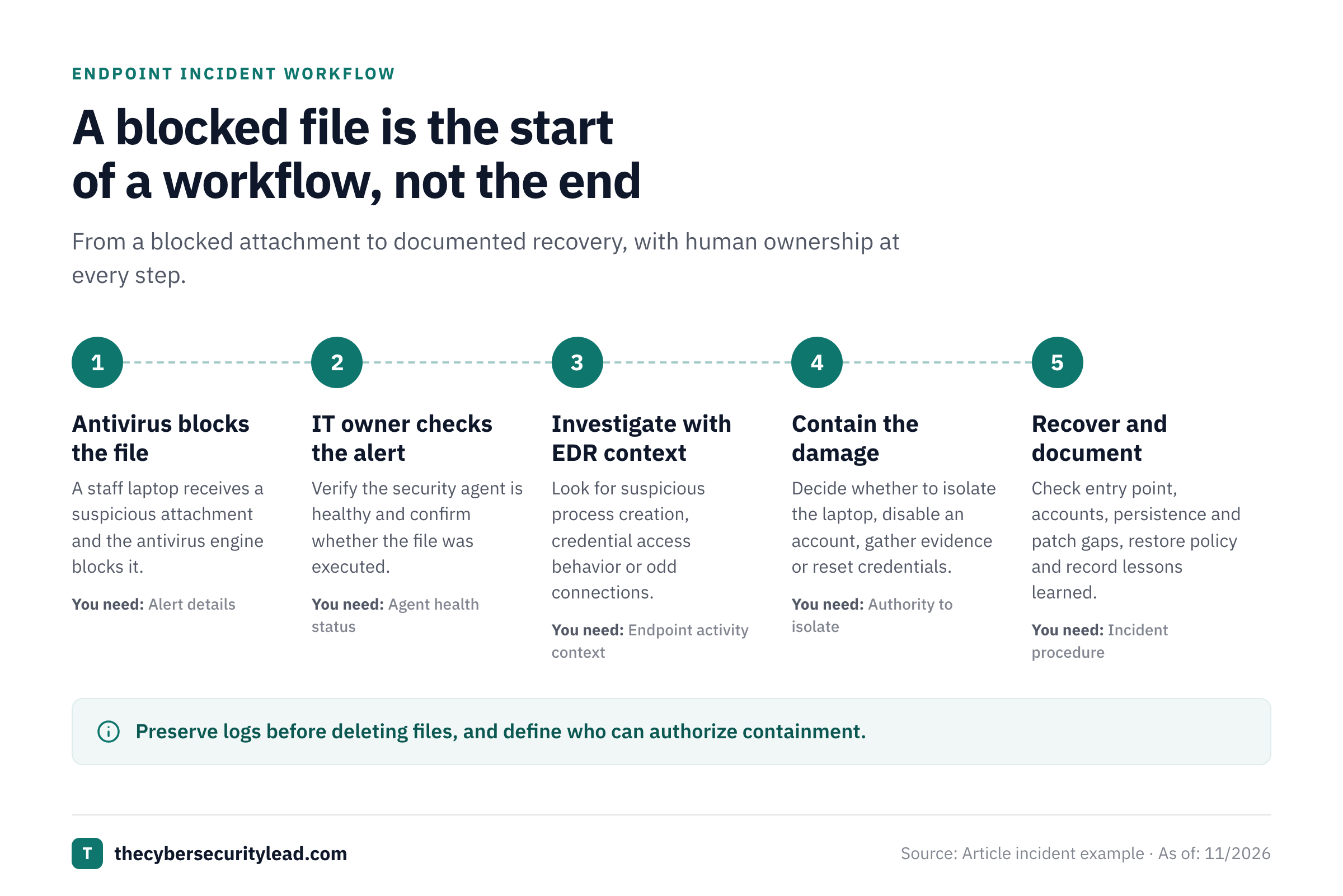
Imagine a staff laptop receives a suspicious attachment. The antivirus engine blocks the file. The IT owner checks the alert, verifies the security agent is healthy and confirms whether the file was executed. If the activity appears limited to a blocked download, the next step may be to educate the user and watch for recurrence.
Now imagine the device also shows suspicious process creation, credential access behavior or connections that require investigation. An EDR platform may give additional context and response controls. The responder must decide whether to isolate the laptop, disable an account, gather evidence, reset credentials or investigate other devices.
The correct next step isn't always to delete files immediately. If a material incident is suspected, preserve relevant logs and follow the organization's incident procedure. Some actions destroy evidence or interrupt the business. Define who can authorize containment and who communicates with affected users.
After containment, check the original entry point, affected accounts, persistence mechanisms, patch gaps and whether other devices show related activity. Recovery should include verifying that required business applications still work and that the protective policy is restored. Record lessons learned so the incident changes future controls and doesn't become a one-off cleanup.
How do you test an endpoint product before buying?
Test endpoint software against real business workflows, not just a vendor dashboard. That's the only way you'll see how it behaves. A structured proof of concept should cover deployment, device health, alert handling, response permissions, reporting and compatibility on the actual operating systems your team uses.
Start with a limited pilot group, and don't skip the awkward devices. Include a standard employee laptop, a developer or power-user device, and any supported specialized machine that often causes protection conflicts. Record baseline performance and normal application behavior, so you'll know what's changed afterwards. Don't intentionally run live malware on a production endpoint as part of a procurement test.
Give the provider representative scenarios instead of a feature checklist, and don't accept a slide deck as an answer. Check that an administrator can see a machine that stopped reporting, that a responder can locate the last alert, identify its context and apply a safe response, that a new laptop receives policy automatically and that a departing worker's device can be marked for follow-up.
Ask for evidence of which license includes each demonstrated capability. Some products show trial or demo features that don't belong to the quoted edition. Preserve screenshots of the product interface where permitted, along with test dates and configuration notes.
What questions should small teams ask about pricing?
Ask about cost per endpoint, license minimums, billing term, server surcharges, support levels, retention and managed response. Price per device isn't the full cost of ownership. EDR can require trained staff to investigate alerts, tune detections, handle false positives and document incidents.
Consider the time burden on an IT generalist. If a product creates many alerts with little context, its operational cost may exceed a lower-priced license. Conversely, a managed response service can cost more on paper but reduce the need for an internal responder who's available outside business hours.
Separate software fees from implementation fees and service fees. Ask whether agent deployment, historical data ingestion, custom detections, integrations and training are included. Review renewal terms and contract exit provisions. Don't compare an annual per-device license against a monthly managed-service quote without normalizing the coverage and service scope.
If the vendor won't show a public price, request a written quote for the exact number and mix of Windows, macOS, Linux and server devices. Write the date and edition next to each proposal so quotes stay comparable.
What if you already have Microsoft Defender?
If you already use Microsoft Defender, first identify which product and license are active. Microsoft Defender Antivirus is an antivirus component in supported Windows installations. Microsoft Defender for Endpoint is a business security product with additional management, detection and response capabilities under specific plans. The names are related but the capabilities aren't interchangeable.
In a managed environment, check how Defender Antivirus behaves alongside a third-party antimalware client. Microsoft documents active, passive and disabled states, and the difference matters. It also explains that EDR in block mode and the behavior of security controls depend on configuration. Don't assume that two installed agents will both provide full active real-time protection.
Inspect the device state and your management portal before buying something new. You might already license certain endpoint protection features through an existing business subscription, but that needs to be verified for your tenant and plan. Don't infer entitlements merely from a product logo or device icon.
For devices outside Windows, evaluate the product's platform-specific feature matrix. A Windows capability list doesn't prove that identical response, policy or vulnerability functions work on macOS or Linux.
How do you reduce endpoint alert fatigue?
You'll reduce endpoint alert fatigue by defining severity, escalation and ownership before enabling every alert. A higher number of alerts isn't itself evidence of better protection. The important measure is whether meaningful events reach someone who can act.
Start with high-confidence malware prevention and the endpoint detections you'll act on. Establish who reviews them, during what hours and how unresolved events are handed off. For recurring benign events, investigate the cause and create narrow, documented exceptions only when justified. Broad exclusions can create blind spots, and that's a real risk.
Use documented test cases to tune detection. If an approved accounting utility repeatedly triggers alerts, investigate the exact path, signer and behavior before changing policy. Ask whether a supplier supports exclusions that are scoped tightly enough to preserve protection elsewhere.
An MDR service can help an understaffed team, but the service boundary must be explicit. The contract should name who investigates outside office hours, who can isolate a device, who approves disabling an employee account and how quickly the customer must respond.
What is the minimum endpoint security baseline?
A minimum baseline combines active endpoint protection, device inventory, updates, least privilege, backups and a documented incident contact. It should be achievable for a small organization without pretending that every team has a security operations center.
Maintain a system of record for laptops and servers. Assign an owner and an approved operating system. Enable supported device security controls. Document who's responsible for updates and basic backup or recovery expectations. Ensure someone receives meaningful protection failures and knows how to escalate them.
Train employees to report suspicious activity and lost devices, and tell them who they're reporting to. Make that process simple enough to follow under stress. A security inbox that nobody monitors isn't an effective response plan. A dedicated contact or existing helpdesk route may be enough initially, provided responsibilities are clear.
CISA guidance identifies both antivirus and endpoint detection/response as useful controls, alongside broader hygiene practices. Treat the guidance as a framework to adapt, not as proof that a specific vendor or expensive license is mandatory for every business.
What are the biggest buying mistakes?
The biggest buying mistake is purchasing a product category instead of a workflow. A company can pay for EDR while leaving machines unregistered, which defeats the point. It may also overinvest in dashboard features that nobody reviews or assume an antivirus license includes fleet-wide response.
A second mistake is mixing household and business plans. A consumer suite's device count and protection claims aren't evidence of centralized employee administration, auditability or enterprise support. The opposite mistake is assuming that advanced business security eliminates the need for regular patching and backups.
A third mistake is selecting only on detection scores. Controlled antivirus lab tests are useful for comparing tested versions and periods, but they don't measure your deployment success, incident process, training, support or time to recover. Don't translate one laboratory number into an unsupported guarantee for the entire endpoint suite.
Finally, avoid signing a service agreement without defining the response boundary. A vendor might provide monitoring but still expect your employees to approve containment and carry out business recovery. Put those responsibilities in writing.
A practical endpoint security decision checklist
Use this checklist to choose the control level that matches your organization:
- Inventory devices: Count laptops, desktops, servers and supported mobile or virtual endpoints; name owners and exceptions.
- Define threats and outcomes: Decide what you must prevent, detect and respond to, including lost devices and compromised accounts.
- Choose a coverage model: Local antivirus for simple individually managed devices, centrally managed EPP for policy and reporting, or EDR/MDR where investigation and response are required.
- Confirm operations: Identify who reviews alerts, who can isolate devices and what happens outside working hours.
- Pilot safely: Test agent health, standard business applications and incident workflow on a representative group.
- Verify commercial scope: Match demonstrated features to exact plans, supported platforms and response services.
- Measure results: Track in-scope device coverage, stale agents, unresolved incidents and configuration exceptions.
- Review regularly: Recheck protection, supported operating systems, device ownership and response responsibilities after staffing or platform changes.
Don't begin with a long list of product names, because it isn't a plan. Begin with the outcomes you can verify each month. Procurement is easier when every vendor has to answer the same operational questions.
Antivirus vs endpoint security FAQ
Can antivirus replace EDR?
Antivirus can prevent and remediate many malware threats, but it doesn't necessarily provide endpoint-level investigation, response context and fleet visibility. Whether EDR is necessary depends on your risk and response capacity.
Does EDR replace antivirus?
Not necessarily. EDR and antivirus can work together or be combined in one licensed endpoint platform. Verify the deployment architecture and each engine's active or passive state.
Is endpoint security only for large companies?
No. Small companies may need centralized policies, inventory and incident ownership. However, a feature-heavy product without staff or a managed service can be a poor fit.
Is endpoint protection the same as EPP?
The terms overlap, and vendors don't use them consistently. EPP usually refers to preventive endpoint controls and centralized management, while broader endpoint security may include EDR, vulnerability management and response operations. Check the actual feature list.
Should every small business purchase MDR?
No. MDR can be helpful when alert coverage and investigation exceed internal capacity. Compare the provider's scope and authority with your actual risk, budget and staffing.
What does XDR add beyond EDR?
XDR attempts to connect endpoint evidence with other data sources, such as identity or network security. It isn't automatically needed for every small company and doesn't replace incident ownership.
Which approach should you choose?
Choose antivirus when you need reliable malware protection on individually managed devices and you're able to verify the basics yourself. Choose managed endpoint protection when you need a fleet-wide policy, health reporting and consistent administration. Add EDR or MDR when your risk and response workload justify deeper investigation and coordinated action.
The best result isn't the longest feature list, without question. It's a system where the right devices are covered, meaningful alerts are handled, failures are visible and recovery responsibility is clear.